Empower every employee. Protect the whole organization.
Phishing is the entry point for most breaches. Users who spot a suspicious email need a fast, no-excuses way to report it — and your security team needs those reports in a structured form they can actually analyze.The Lavawall® Phishing Reporter adds a Phish Report button right inside Outlook, exactly where users already work.
One click. No separate login. No OAuth consent screen. No fresh credentials for users to manage. The add-in identifies the user automatically from the Outlook mailbox it’s running in — the same identity Microsoft 365 has already authenticated.
- Works in classic Outlook, new Outlook, Outlook on the web, Outlook for Mac, Outlook for iOS, and Outlook for Android.
- Deployed centrally by an admin — users don’t install anything themselves.
- No additional sign-in screens, no consent dialogs requesting access to your mail, no third-party OAuth grants.
- Reports include the full message source, headers, links, and attachments so your analysts have everything they need.
- Every report feeds the Lavawall® reputation system to help you spot campaigns and repeat offenders.
- Admin dashboard with reports, domain reputation, user activity, statistics, and tunable settings.

Where users find the button
On most Outlook clients the Security group with the Phish Report button appears directly in the message ribbon while reading a message. When the window is narrow or the ribbon is crowded, Outlook collapses the group to a single Security icon — click it to reveal Phish Report. On Outlook Web with a busy ribbon, the button may live one level deeper, under the More Apps icon (the app-grid icon at the right of the message toolbar).
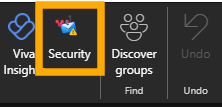
When ribbon space is tight, click the Security icon to reveal Phish Report.
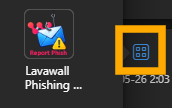
If hidden, open More Apps and pick the Lavawall icon.
Plain-language analysis, in under three seconds
When the user clicks Phish Report, the taskpane opens and shows what the email actually is — in plain English, with technical detail one tap away for anyone who wants it.
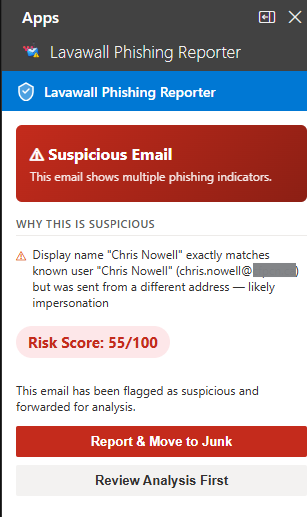
- A clear risk score with traffic-light banding (green < 35, amber 35–69, red ≥ 70) so the user knows immediately whether to act.
- SPF, DKIM, and DMARC rendered as one-glance pills with plain-English tooltips — not raw header text.
- DMARC alignment failures detected and explained in the user’s language — with platform-specific fix steps (Mailchimp, SendGrid, Constant Contact, Mailgun, Amazon SES, HubSpot, Salesforce, and more). See the DMARC fix guidance section below.
- Sender-domain age and reputation, with explicit "registered N days ago" or "established X years" instead of just a date.
- Impersonation detection across the org tree — flags “the display name matches an internal user, but the address differs” while suppressing the alert for the user’s own legitimate brand subsidiaries.
- Link analysis: real destinations of shortened URLs (resolved server-side, user never exposed), typosquat detection, base64-encoded recipient identifiers, and behavior through Vade/Proofpoint/Mimecast/Cisco wrappers.
- Attachment analysis: PDF risk by action (print dialog vs. silent fetch), Office macro analysis, .eml/.msg parsing, and ZIP inspection.
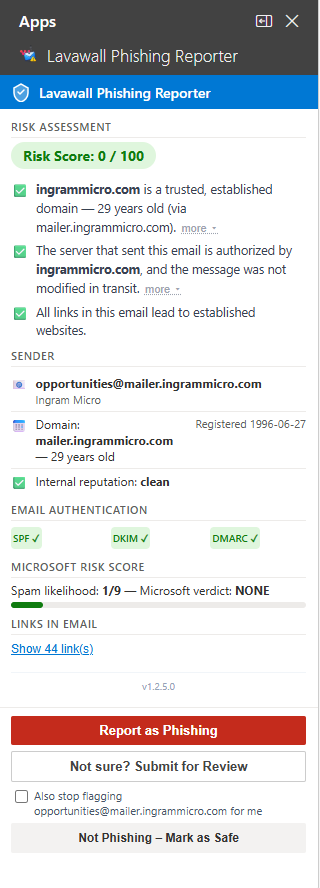
When a sender is spoofed
When SPF or DKIM fails outright, or DMARC enforcement triggers, the taskpane shows it directly — with the specific reason in language an end user can act on, not raw header text.
On Outlook for Android and iOS
Mobile Outlook is supported. Some message data isn’t exposed to add-ins on mobile clients yet — specifically, the full message headers needed to verify SPF/DKIM/DMARC for a particular email. The Reporter handles this honestly: instead of pretending the checks ran, it shows a clear "headers unavailable on this device" notice and points the user to Outlook on the web or desktop for full verification. All other checks — sender, links, attachments, impersonation, simulation detection — still run normally on mobile.
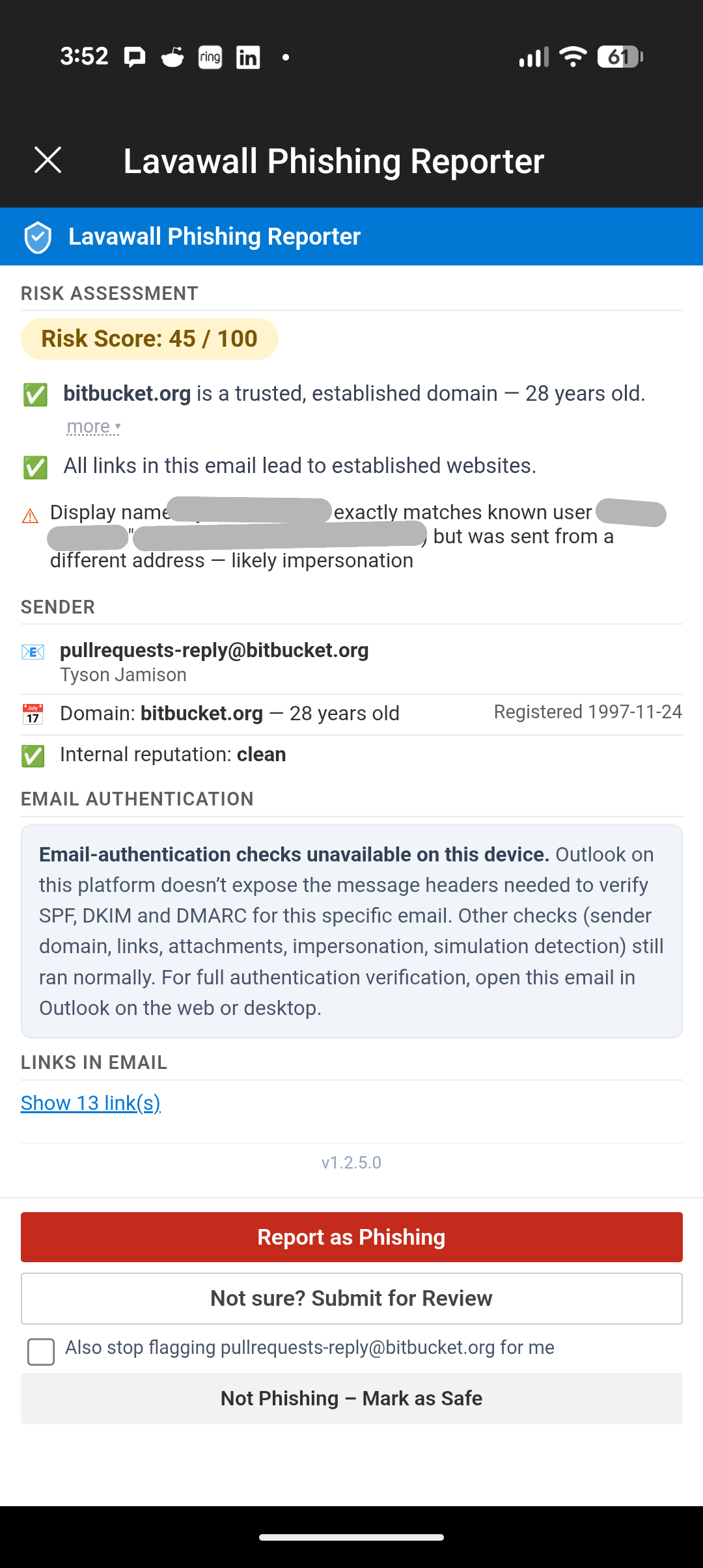
Android Phish Report taskpane — the example here is a Bitbucket pull-request notification, which Bitbucket stamps with the author’s name. Lavawall flags the display-name / domain mismatch.
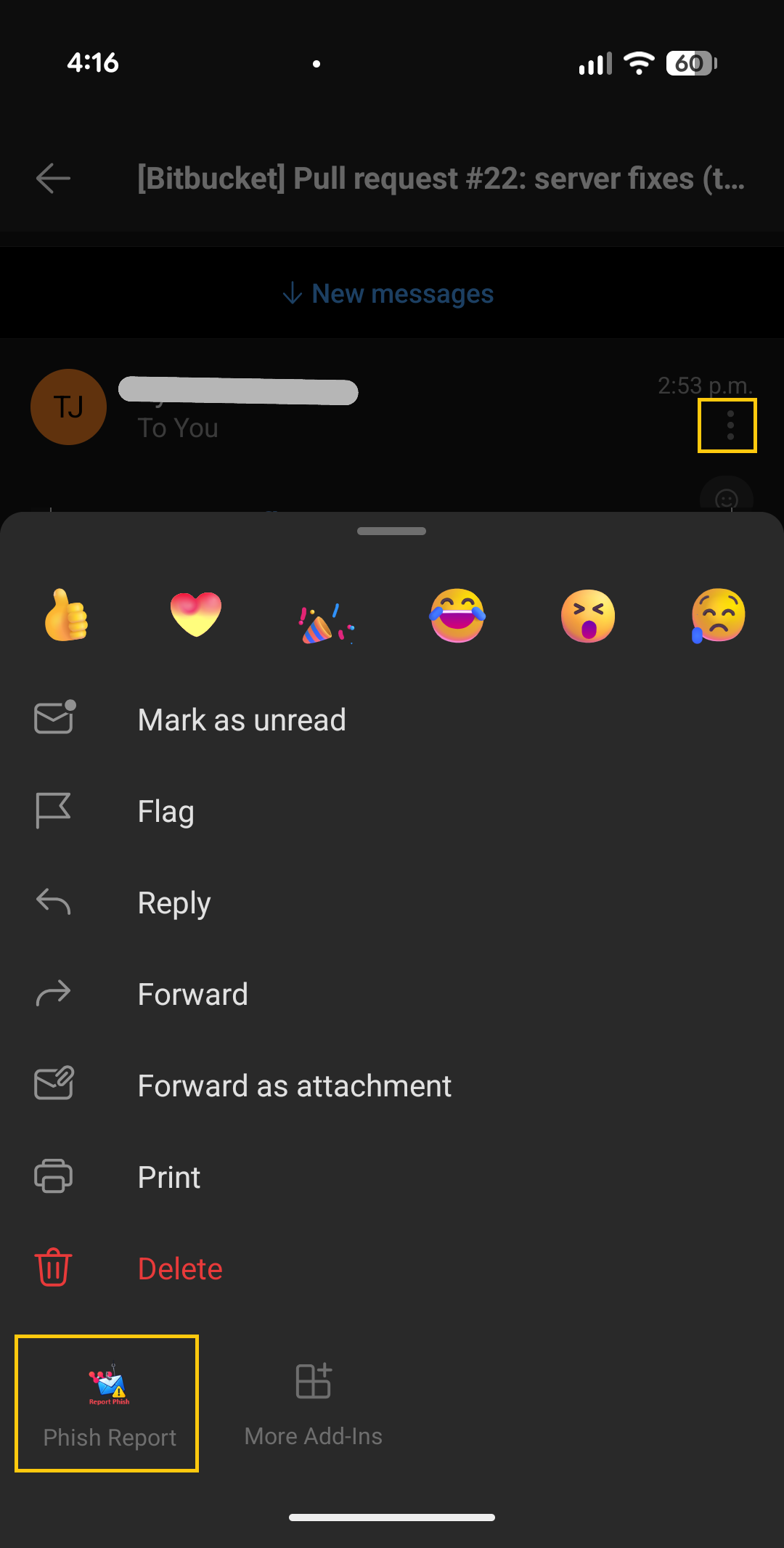
To open Phish Report on Android, tap the three dots beside the sender, scroll down if needed, and choose Phish Report.
DMARC fix guidance — a built-in expert MSPs can stand behind
The most common reason a legitimate email gets flagged isn’t that it’s phishing — it’s that the real sender hasn’t set up their email authentication correctly. The newsletter from a long-standing partner. The receipt from a SaaS vendor. The invoice from a key supplier. Every one of these can fail DMARC alignment and look like a spoof to anything that’s actually checking.
When Lavawall detects that pattern, the Phishing Reporter doesn’t just flag the email — it explains exactly what’s wrong with the sender’s setup and how to fix it, with the specific DNS records to add. The first time a customer’s vendor sees this guidance, the natural reaction is "where did this come from?" — and the answer is your MSP. The expert advice is right there in the add-in your customer already trusts.
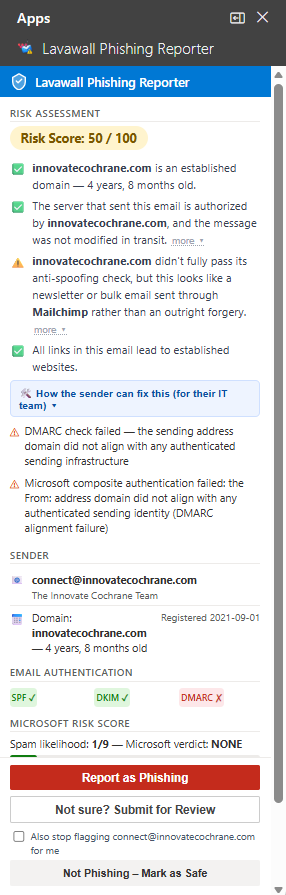
In this example, an email sent through Mailchimp failed DMARC alignment because the sending domain’s DKIM keys for Mailchimp aren’t published. Lavawall shows the user a plain-language explanation, then provides the exact CNAME records the sender’s admin needs to publish to fix it — and a one-click link to the free Lavawall DMARC Monitoring tool so they can confirm the fix worked.
“How the sender can fix this” — the detail an MSP can hand over
Clicking the How the sender can fix this link in the taskpane expands a step-by-step remediation panel. The instructions are written for the sender’s IT person, not your user — pasteable DNS records, the exact subdomains involved, and a verification step. Your customer can forward the whole thing on, or you can pick it up as an MSP and run point on the fix yourself.

The expanded detail panel shows, for the specific failing platform:
- The exact CNAME records that need to exist for DKIM alignment (with the live, copy-pasteable host and target values).
- The exact TXT records for SPF inclusion when the sender uses a non-default sub-domain.
- A note about whether the platform is already using its own d= (and DMARC alignment just needs the customer’s domain to be added) or whether a custom domain setup is required.
- A direct link to verify the fix using the free Lavawall DMARC Monitoring tool, with the affected domain pre-populated.
Lavawall detects and provides fix guidance for messages sent through the major bulk email platforms, including:
- ✓ Mailchimp
- ✓ SendGrid
- ✓ Constant Contact
- ✓ Mailgun
- ✓ Amazon SES
- ✓ HubSpot
- ✓ Salesforce / Pardot
- ✓ Campaign Monitor
- ✓ ActiveCampaign
- ✓ Brevo (ex Sendinblue)
- ✓ Klaviyo
- ✓ Microsoft 365
- ✓ Google Workspace
- ✓ Postmark
- ✓ SparkPost
For MSPs, this is a built-in prospect generator. Every time the Lavawall add-in shows a customer’s vendor or partner exactly how to fix their email authentication, the customer sees their MSP’s product solving a problem nobody else flagged. The conversation that follows — "we got this from our IT provider, who runs Lavawall… can you help us implement it?" — is a warm-introduction lead that costs nothing to generate.
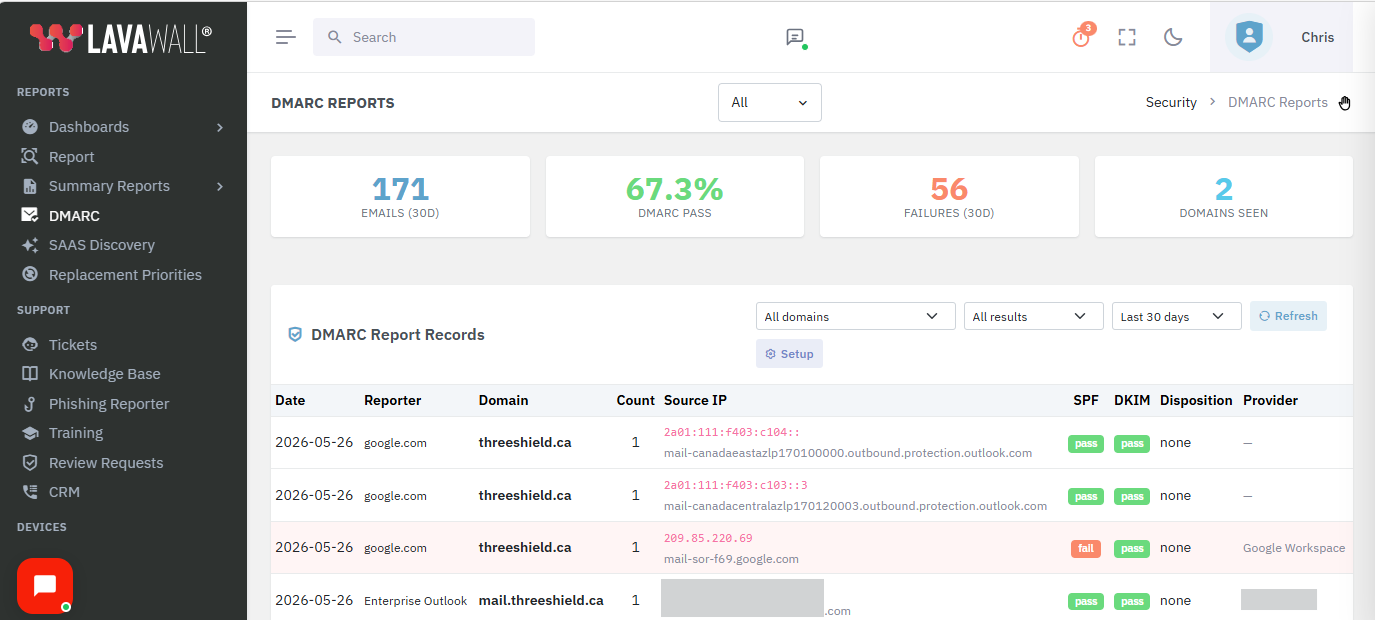
The companion Lavawall DMARC Monitoring tool takes this further by ingesting DMARC aggregate (RUA) reports from any domain and turning them into a plain-language dashboard. It’s free to use, and pairs naturally with the Phishing Reporter for customers who want to track their own authentication posture over time.
Recognizes phishing simulations — and rewards users for catching them
When a user clicks Phish Report on a training simulation, the Reporter detects it automatically and shows a positive screen instead of a security alert. "Well spotted — this was a phishing test. You did the right thing." No ticket fires. No admin is paged. The user gets the dopamine hit of catching the simulation, which is exactly what makes the training stick.
Detection uses reliable, per-message signals (custom internet headers like X-KnowBe4-PhishAlert, X-PhishMe-Id, X-Hoxhunt-Simulation, X-Proofpoint-PSAT, X-MS-Exchange-Organization-PhishSimOverrideRule, and others) plus dedicated simulation infrastructure domains. We deliberately do not trust bare corporate domains like knowbe4.com — those are used for marketing email too, and treating them as simulations would mis-classify real mail.
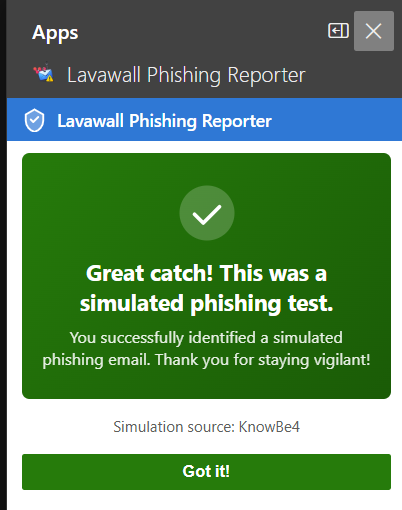
The following simulation platforms are detected automatically:
- ✓ KnowBe4
- ✓ Microsoft Defender Attack Simulator
- ✓ Proofpoint Security Awareness
- ✓ Cofense PhishMe
- ✓ IRONSCALES
- ✓ Hoxhunt
- ✓ Barracuda PhishLine
- ✓ Mimecast Awareness Training
- ✓ Infosec IQ
- ✓ Sophos Phish Threat
- ✓ Huntress Security Awareness
- ✓ Abnormal Security
- ✓ GoPhish
- ✓ Lucy Security
- ✓ Wombat / Proofpoint
- ✓ Terranova Security
- ✓ Ninjio
- ✓ Curricula
- ✓ Phished.io
- ✓ LMS365 Awareness
Security first — no OAuth, no broad mailbox grants, no separate identity
Lavawall® brings you enterprise-grade phishing intake without compromising user or tenant security. The Reporter is built on Microsoft’s native Office.js add-in runtime, which means:
- No OAuth consent screens. Users are never asked to grant "read your mail", "read and write mail you can access", "send mail as you", "send mail on behalf of others", or "maintain access to data you have given it to access" — the long list of permissions some competing reporters demand. Microsoft already trusts the user’s Outlook session; we use that, not a separate Graph API grant.
- No separate login. The user’s identity is established by Outlook itself when they open the mailbox. The Reporter doesn’t prompt for credentials, doesn’t hold tokens, and doesn’t need an Entra ID consent flow per user. (Admin console SSO via Entra ID is available, but is only for admins viewing the dashboard — not end users reporting email.)
- Read-only access to the message being reported. The add-in never reads unrelated mail, never enumerates the inbox, never runs in the background.
- No password or token access to the mailbox. No client secret, no service principal, no app registration with Mail.Read or Mail.ReadWrite at the tenant level.
- Reports transmitted over TLS 1.2+ directly to your tenant’s Lavawall console.
- No third-party tracking, pixels, or analytics in the taskpane.
- Per-tenant data isolation — one organization’s reports are never visible to another.
- Granular role-based access to the admin dashboard.
- Full audit trail of who reported what, when, and the disposition of every report.
- Deployable via Microsoft 365 centralized deployment or the Integrated Apps portal.
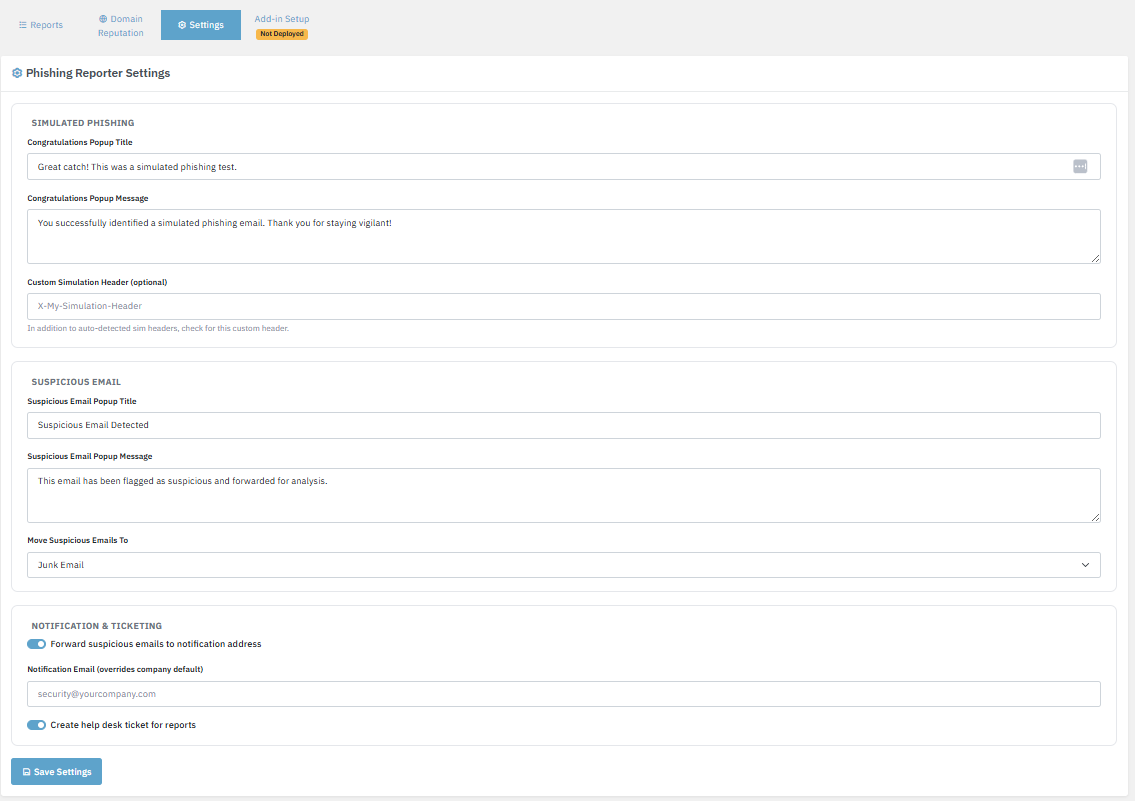
Configure reporter behavior and messaging per company from the admin console.
Trusted-sender allow list — tenant, MSP, and per-user "Just me"
Some legitimate senders look spoof-shaped on the wire. Newsletter platforms, service notifications (notifications-noreply@bitbucket.org, GitHub, Jira, Confluence), and partners using shared infrastructure can trigger impersonation or free-webmail heuristics that aren’t actually phishing. The trusted-sender allow list lets you silence those flags at the right scope:
- This company — standard tenant-wide rule, set by an admin.
- MSP & children — an MSP can roll out a trusted-sender entry across every customer tenant in one action.
- Global — reserved for Lavawall, used for senders every customer trusts (e.g. Microsoft 365 administrative mail).
- Just me (per-user) — an individual user can silence false positives for themselves with one tap (a checkbox alongside “Mark as Safe”), without affecting anyone else. Per-user entries are private and only suppress flags for the user who created them.
The same allow-list also accepts entries auto-sourced from device emails (addresses found in Outlook on the company’s own managed devices) as a soft trust signal — it only softens personal-webmail noise, never overrides a hard spoofing signal.
Full-fidelity intake — so your analysts have everything they need
Forwarded phishing emails lose critical forensic information — headers get rewritten, attachments get stripped, and the chain of custody is broken.
The Phishing Reporter captures the full original message including every header, link, and attachment exactly as the user received it.
Your analysts see what the user saw, not what Outlook’s forwarding engine decided to include.

Sender, authentication, score, and reasons — the same view analysts use to triage every report.
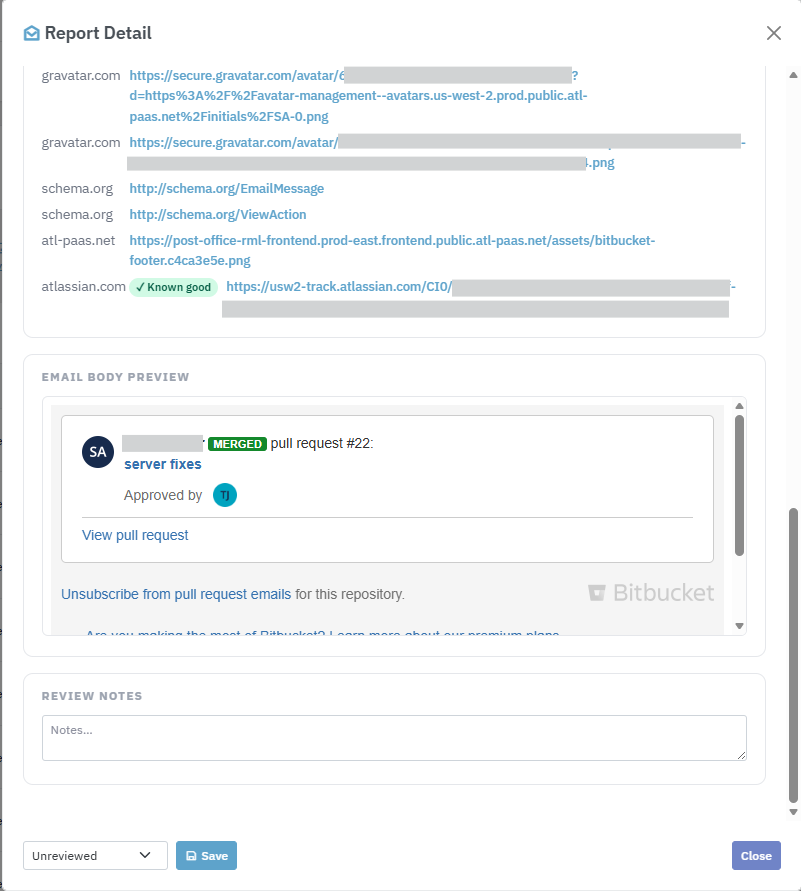
Scrolling further reveals the original headers, every embedded link and attachment, and the sandboxed body preview.
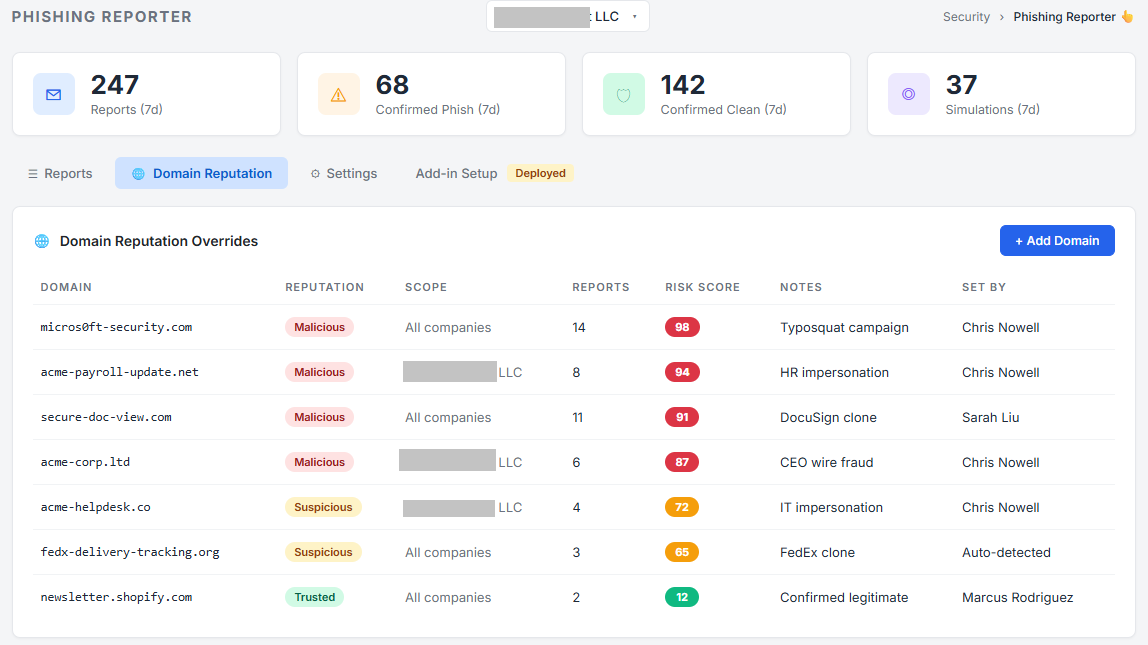
Every reported sender domain is scored and tracked over time. Repeat offenders, newly-registered domains, and typosquats bubble to the top of your reputation view.
Click any domain to see every report, every recipient, and every observed indicator in one place.
User activity tracking — spot disengaged and at-risk users
The User Activity tab in the admin console shows, per user: how many emails they checked, how many simulations they caught, how many they reported, how many they marked as safe, and how many they opened but took no action on. CSV export ready for your security awareness review.
The "checks no action" column uses an event-subtraction model rather than relying on a browser-close signal that Outlook task panes don’t deliver reliably — so the count is accurate even when users dismiss the pane in unusual ways.
Sees through your email security stack — not blinded by it
Most email today doesn’t arrive straight from the sender. It passes through one or more security services first — cloud gateways that scan for spam and malware, and link-protection tools that rewrite every URL so it can be checked again at the moment of click. These layers do important work, but they have an unfortunate side effect for anyone trying to analyze a message after the fact: they change the evidence.
When a message travels through a security gateway, the gateway often becomes the “last sender” in the technical record. A naïve analyzer then checks the gateway’s reputation instead of the real sender’s — and a malicious email can look perfectly clean simply because it passed through a trusted, well-known service on the way in. Link-protection tools cause a similar problem: every link in the email is replaced with a long address pointing at the security vendor, so the actual destination is hidden from view.
The Lavawall® Phishing Reporter is built to look past these layers and analyze what actually matters:
- Authentication that reflects the true sender. When a message has been relayed through a security service, we identify the original sending source and evaluate SPF, DKIM, and DMARC against it — not against the gateway that simply passed the message along. The result is shown in plain language with the technical detail one click away.
- Real link destinations, not the wrapper. Where a link has been rewritten by a protection tool and the true destination can be safely recovered, we recover it and analyze where the link actually goes — its age, its reputation, and whether it’s a look-alike of a brand you trust. Where a tool keeps the destination sealed until click-time, we say so plainly rather than giving a false “all clear” based on the security vendor’s own trusted name.
- A clear record of what protected the message. For your analysts, the console shows which spam filters, malware scanners, and link-protection tools handled the email — useful context that a forwarded copy would simply lose.
We work alongside the major email security platforms your organization may already use, including Microsoft 365 Defender, Cisco Secure Email, Proofpoint, Mimecast, Barracuda, Egress, Vade, and others — complementing them rather than competing with them. Your users still get a simple, plain-language answer in Outlook; your analysts get the full picture in the console.
Email security gateways & link-protection tools we see through and work alongside:
- Microsoft 365 Defender (EOP)
- Microsoft Safe Links
- Cisco Secure Email (IronPort)
- Proofpoint
- Proofpoint URL Defense
- Mimecast
- Mimecast URL Protect
- Barracuda
- Barracuda Link Protection
- Egress Defend
- Vade Secure
- Sophos Email
- Forcepoint
- Symantec Email Security.cloud
- Trend Micro Email Security
- Storagepipe / Thrive
- FireEye / Trellix
Works everywhere your users read email
The add-in is certified for every modern Outlook surface. Deploy once and it appears on every client your staff use — no per-device install, no manual updates.
Updates to the add-in are pushed automatically through Microsoft’s add-in infrastructure — no client-side deployment needed when we ship new features or fixes.
Admin dashboard built for security teams
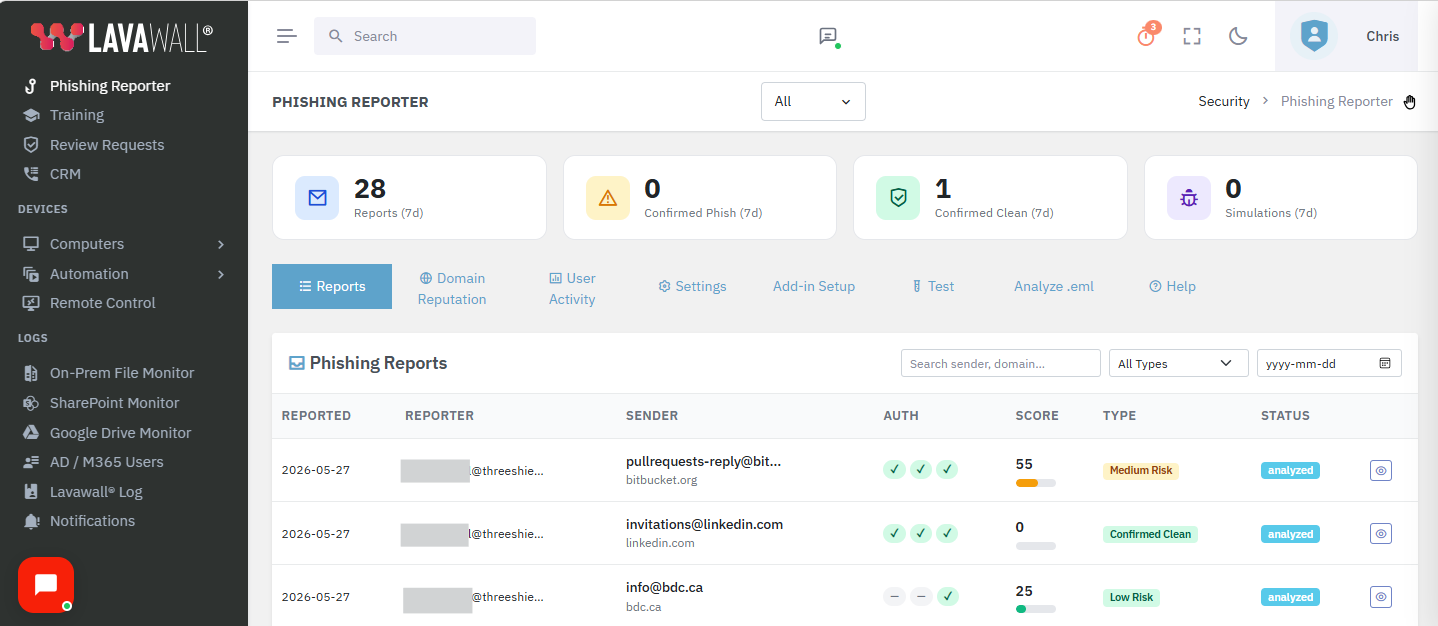
Every report lands in a single pane of glass with the context your team needs to triage.
Filter by reporter, sender, domain, date, disposition, or free-text search.
Drill from a report into the domain reputation, the reporter’s history, and the full raw message.
Easy to deploy — no client software
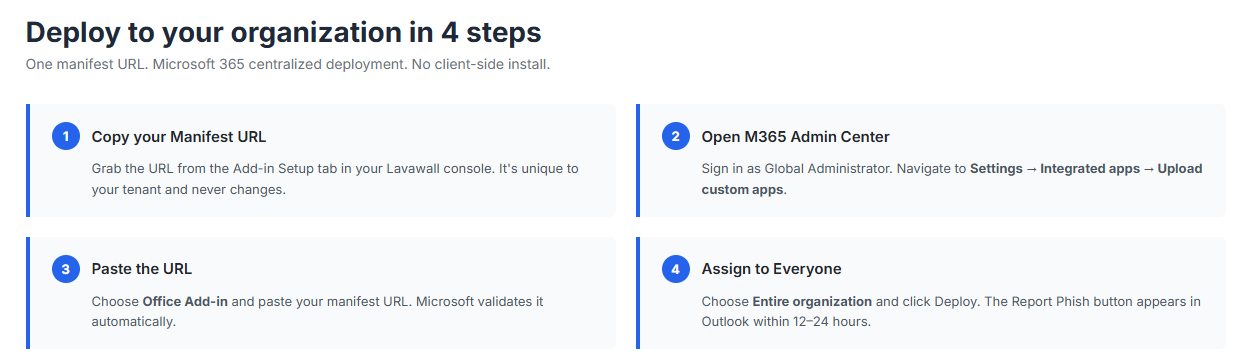
The add-in is deployed to all your users at once through Microsoft 365’s built-in centralized deployment.
Paste the manifest URL into the M365 admin center, assign to your entire organization, and the button appears in Outlook within 24 hours.
No MSIs. No Group Policy. No user action required. No OAuth consent screen during rollout.
Multi-tenant — built for MSPs
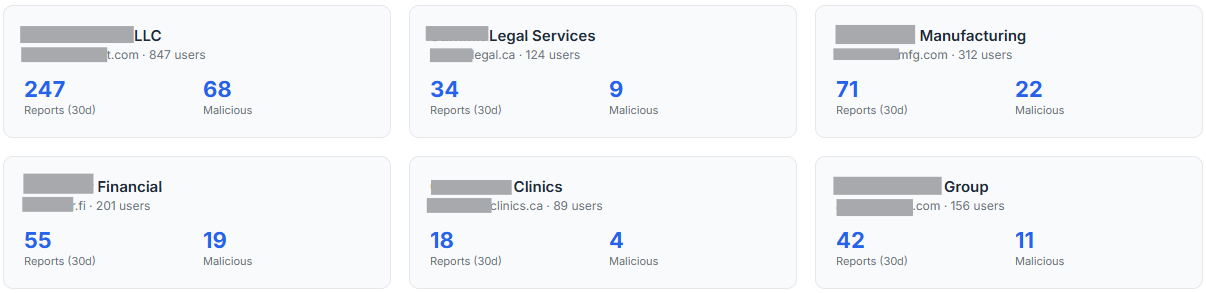
Every Lavawall® tenant gets its own isolated reporting pipeline, admin console, and reputation database.
MSPs can manage phishing reporting across every client from a single Lavawall® account, while keeping each client’s data, users, and configuration strictly separated.
The same multi-tenant architecture that powers our remote support, threat hunting, and compliance tools extends to the Phishing Reporter — no separate deployment per client, no data leaking between tenants.
What’s included
Every deployment of the Lavawall® Phishing Reporter ships with:
- The Outlook add-in (Windows, Mac, web, iOS, Android)
- Central admin console with reports, reputation, user activity, settings, and setup tabs
- Structured report intake with full message fidelity
- Trusted-sender allow list with company / MSP-children / global / per-user "Just me" scopes
- Phishing simulation detection across 20+ vendors with positive user feedback
- DMARC alignment detection with platform-specific fix guidance + free DMARC Monitoring tool
- Domain reputation scoring and historical tracking
- User activity tracking with CSV export
- Per-report audit trail and disposition tracking
- Help-desk ticket creation on report (integrated with the Lavawall help desk)
- Microsoft 365 centralized deployment support
- Microsoft Entra ID SSO for the admin console (admin only — not end users)
- Email notifications for new reports (configurable)
- Role-based access control for the admin dashboard
The Phishing Reporter is part of Lavawall® Security Awareness Training — included in the Complete tier, or a per-user add-on (C$1.95 / US$1.50 per user/mo, billed month-to-month with no multi-year contract) on the Grow and Professional tiers.
PDF Attachment Analysis
When you report an email that contains a PDF attachment, Lavawall automatically scans the file for structural characteristics used in malicious documents. The analysis examines what the code actually does before assigning a risk level — so a print button won’t trigger the same warning as a silent data-exfiltration script.
- JavaScript in a PDF
PDFs can contain JavaScript that runs inside Adobe Reader. Legitimate uses include print dialogs (
this.print()) and basic form navigation. However, JavaScript can also silently fetch remote URLs, submit your data to attacker-controlled servers, enumerate local drives, or exploit vulnerabilities in the viewer itself.Lavawall reads the actual JavaScript source. If the code only calls safe functions (print, alert, zoom, page navigation) it’s marked informational. If it calls network, file, or execution APIs it’s flagged critical. MITRE ATT&CK T1204.002 ↗
- OpenAction — code runs when PDF is opened
OpenAction tells the viewer to do something the moment the file opens, without any user click. When combined with a safe script like a print dialog, this is normal and common in printable forms. When combined with dangerous JavaScript, it means the attack begins the instant the victim opens the file. PDF Reference §12.6.4.2 ↗
- Launch action — runs an external program
A Launch action instructs the viewer to run an external file or application on the user’s computer. There is no legitimate business use for this. It is almost universally used to drop and execute malware, and is one of the strongest indicators of a malicious document. CISA Alert AA10-089A ↗
- JBIG2Decode — image compression exploit technique
JBIG2 is a compression format for images. A vulnerability in how Acrobat processes JBIG2-compressed images was exploited by the NSO Group’s Pegasus spyware (CVE-2009-0927 family) to achieve silent code execution. Its presence in an unsolicited email is a serious red flag. Citizen Lab FORCEDENTRY analysis ↗
- Embedded file
A PDF can contain another file embedded inside it — any file type, including executables. Attackers hide malware or second-stage exploits inside what looks like an ordinary document. The embedded file may be extracted automatically by JavaScript, or require the user to click an attachment annotation within the PDF. MITRE ATT&CK T1027 ↗
- Form that submits data to an external server
A SubmitForm action sends data typed into the PDF’s form fields to a remote URL. In a phishing context this harvests credentials or personal information. The user may not realize the form sends their input to an attacker’s server rather than a legitimate destination. MITRE ATT&CK T1598 ↗
- Rich media (Flash/video)
Rich media annotations were designed for Flash, audio, and video. Adobe Flash reached end-of-life in December 2020 and Flash-based PDF exploits were common throughout its lifetime. Most modern viewers block rich media by default.
- XFA (XML Forms Architecture)
XFA is a complex XML form format that supports embedded JavaScript and can display entirely different content than the static PDF suggests. Adobe Reader deprecated XFA support in 2021. It is rarely used in ordinary business documents and has been exploited in targeted attacks. Adobe XFA deprecation ↗
- Additional actions (/AA) — triggers on page events
Additional actions define scripts that trigger on page open, close, or visibility changes. This lets attackers run code at multiple points during the document lifecycle without a visible user action, making the behavior harder to detect or attribute.
- Hyperlinks
The PDF contains one or more hyperlinks. In most documents this is completely normal. In an unsolicited PDF, links may lead to phishing sites or malware downloads. Lavawall also checks the link destinations against its domain reputation database.
- Fillable form (AcroForm)
AcroForm is the standard fillable-form format used in tax forms, applications, and invoices. On its own it is not dangerous. Lavawall only raises the risk level when AcroForm is combined with an external SubmitForm action.
- Encrypted or password-protected
Encryption prevents email security gateways from scanning the PDF before delivery. Attackers sometimes send password-protected malicious documents with the password in the same email, knowing that the gateway cannot inspect the file but the recipient can open it.
- Compressed object streams (/ObjStm)
Object streams are a legitimate space-saving technique in modern PDFs. They are also used to obfuscate a PDF’s structure, hiding suspicious objects from simpler security scanners. Lavawall decodes object streams before scanning so obfuscated content is still checked.
Support
We’re here to help. If you’re evaluating the Phishing Reporter, deploying it for the first time, or running into issues after rollout, reach out through any of the following:
- Email and web form: contact.php — typical response within one business day
- Phone (Alberta): 1-403-538-5053
- Phone (British Columbia): 1-778-731-1339
- Phone (Ontario): 1-289-724-8829
- Phone (United States): 1-406-988-7333
When contacting us about a deployment issue, please have the following ready if possible:
- Your tenant’s Microsoft 365 domain (for example,
contoso.onmicrosoft.com) - The error message or correlation ID from the admin center, if any
- Screenshots of the problem (optional but helpful)
Common questions
Do users have to sign in or grant permissions?
No. The Reporter uses the existing Outlook identity. There is no OAuth consent screen, no separate password, no token to maintain. End users open Outlook as they always do, and the Phish Report button is right there.
Does the add-in read all my email?
No. The add-in uses Microsoft’s native Office.js permissions to read only the message the user is currently viewing when they click Phish Report. It has no access to your mailbox otherwise, no access to other users’ mail, and no background activity.
Do the reports leave my Microsoft 365 tenant?
The reports are transmitted over TLS 1.2+ to your dedicated Lavawall® console. Your tenant’s data is stored in your tenant’s region and is never accessible by other Lavawall® customers.
Does it work with shared mailboxes?
Yes. Any mailbox that supports Outlook add-ins (which includes all standard user mailboxes and most shared mailboxes in Exchange Online) can use the reporter.
How long does deployment take to reach users?
Microsoft propagates add-in deployments within 12–24 hours for most tenants. Individual users can pick up the add-in sooner by restarting Outlook.
Can I customize the button name or color?
Yes. MSPs and larger organizations can request co-branded variants with their own button label, tooltip, and confirmation messaging. Contact us for details.
What happens to the reported email in the user’s mailbox?
By default, the reported message is moved to a folder you configure (for example, Reported Phishing) or left in place — your choice, per tenant. We never permanently delete user mail.
If you have any questions or need further assistance, feel free to reach out through our chat, phone, or email on our contact page!
What this tool shows you that Defender and KnowBe4 don’t
Microsoft Defender for Office 365 and KnowBe4 both operate at the gateway — before email reaches the user. The Lavawall Phishing Reporter works at the moment a user is reading a suspicious email, giving them the specific analysis they need to make a good decision right now. No waiting for an admin. No ticket. No guessing. No OAuth consent screen demanding access to read, send, and modify the user’s mail.
| Capability | Lavawall Phishing Reporter | Defender for O365 | KnowBe4 PhishAlert |
|---|---|---|---|
| No OAuth consent screen / no permission grants from the user | ✓ Uses native Outlook identity | ✓ | ✗ Requests broad mailbox permissions (read/write mail, send as user, send on behalf) |
| Plain-language risk summary shown to the user | ✓ On every email, instantly | ✗ Admins only | ✗ Not provided |
| Sender domain age & registration date | ✓ Shown in the pane | ✗ | ✗ |
| SPF / DKIM / DMARC in plain English | ✓ Per-email, human-readable, with "more" links for technical detail | Headers only (admin) | ✗ |
| DMARC alignment fix guidance with platform-specific DNS records | ✓ Mailchimp, SendGrid, Constant Contact, Mailgun, SES, HubSpot, Salesforce | ✗ | ✗ |
| Authentication checked against the true sender behind a security gateway | ✓ Sees past relays so a clean-looking gateway doesn't mask a bad sender | ✗ | ✗ |
| Recovers the real destination of links wrapped by protection tools | ✓ Where safe to recover; clearly flags those that stay sealed until click | ✗ Safe Links wraps; destination stays hidden | ✗ |
| PDF contextual analysis (benign vs. dangerous JS) | ✓ Distinguishes harmless print dialogs from real exploits | Partial (gateway) | ✗ |
| Office macro / embedded script analysis | ✓ | Partial (gateway) | ✗ |
| Attached email analysis (.eml / .msg) | ✓ | ✗ | ✗ |
| URL shortener expansion (safe, server-side) | ✓ No user exposure to destination | Safe Links wraps all | ✗ |
| Recipient identifier in URL (credential pre-fill detection) | ✓ Decodes base64, shows what is in the link | ✗ | ✗ |
| Typosquat detection | ✓ e.g. paypa1.com → paypal.com | Limited | ✗ |
| Sending server IP, ISP, country, TOR / VPN flags | ✓ | ✗ | ✗ |
| Per-user trusted-sender list ("Just me") | ✓ User silences a sender for themselves with one tap | ✗ | ✗ |
| Positive feedback for reporting simulations | ✓ Detects 20+ platforms automatically | ✓ Defender sims only | ✓ KnowBe4 sims only |
| Multi-tenant MSP dashboard | ✓ Native | Requires MDE per tenant | Limited |
| Ticket creation on report | ✓ Integrated help desk | ✗ | ✗ |
| Original headers in easy-to-copy format | ✓ | ✗ | ✗ |
Troubleshooting
- Add-in doesn’t appear for a shared mailbox
Microsoft doesn’t load personal add-ins when you open a shared mailbox in a separate OWA window. Fix: (1) Deploy the add-in directly to the shared mailbox in M365 Admin Center → Integrated Apps, assigning it by the shared mailbox email address. (2) In Outlook desktop, add the shared mailbox as a full account (File → Add Account) — your add-ins will load in that context.
- SPF / DKIM / DMARC showing as “headers unavailable on this device” on mobile
Outlook on Android (and iOS before v4.2405) does not yet expose the full message headers to add-ins. The Reporter honestly reports this rather than displaying a fake verdict. Open the same email in Outlook on the web or desktop for full SPF/DKIM/DMARC verification. All other checks (sender, links, attachments, impersonation, simulation) still run on mobile.
- SPF / DKIM / DMARC showing as gray on desktop or web
Exchange occasionally strips
Authentication-Resultsfrom add-in views. The Reporter uses three fallbacks: X-Forefront-Antispam-Report, compauth inference, and live DNS SPF / DKIM key lookups. If all three fail (e.g. heavily-forwarded email), the status shows “—”. Gray means unknown, not failed.- Email not moved to Junk after reporting
Moving mail requires
moveToAsync(Office.js Mailbox 1.8). Microsoft has not enabled this in OWA as of 2026. It works in Outlook desktop for Windows and new Outlook. The report is always submitted regardless.- Add-in stuck on “Analyzing email…”
Usually a JavaScript error. Press F12, check the console for an error on taskpane.html. Common causes: a syntax error in a recent update, or a network error reaching the analysis endpoint.