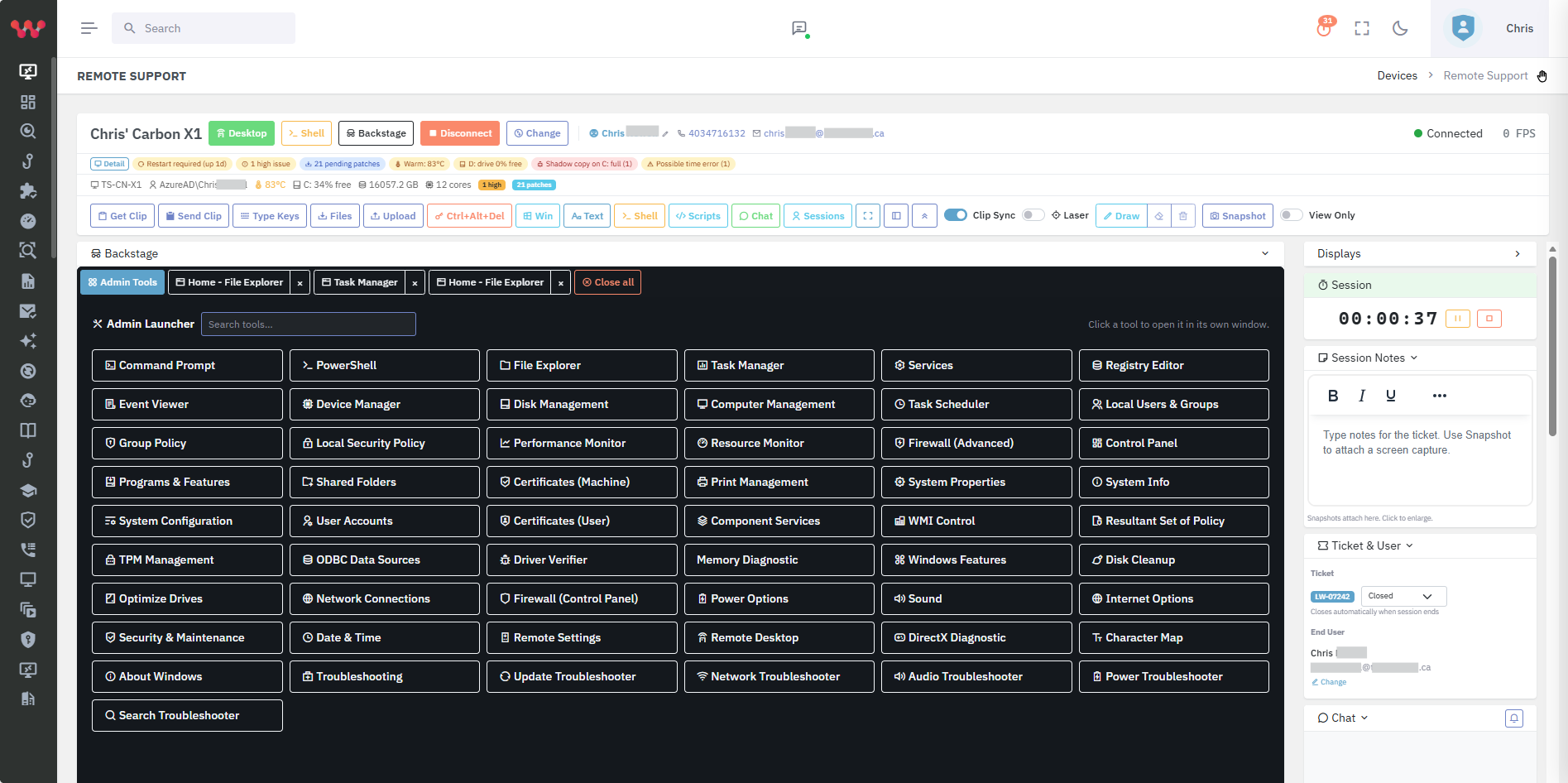
Bomgar (now BeyondTrust Remote Support) is a polished privileged remote-access platform aimed at large enterprises. Lavawall® delivers MSP-grade multi-tenant remote support with no operator agent, browser-based mobile and desktop access, and built-in device health context — bundled with patching, security, and GRC at a fraction of the cost.
Where Lavawall® wins for MSPs
No operator agent to install — Lavawall® remote support runs in the technician's mobile or desktop browser.
Sessions start instantly; no waiting for a heavy local client to launch.
Multi-monitor view with thumbnails to find the right display fast.
Backstage shell access — terminal without a GUI session — for headless servers or quiet user-impact work.
Live device health surfaced in the session: patch status, refresh priority, temperature, disk, RAM, CPU, last reboot reason.
Tickets and timekeeping fill in directly from the remote-support screen.
Country-level access restrictions enabled by default; certificate-level mutual auth between server and clients.
Comprehensive audit logging for GUI desktop sessions, shell sessions, and shell commands.
Consent prompt and active-watching notification bar give end-users the same trust signals enterprise tools provide.
Built on a TLS-in-TLS tunnel that survives TLS-inspection proxies without breaking — and never relies on third-party tools (ScreenConnect, TeamViewer, Splashtop) that have had high-profile breaches.
Per-named-agent pricing: US$45/month for unlimited remote sessions, or US$89/month bundled with Help Desk Pro.
Where Bomgar / BeyondTrust wins
Mature privileged-access workflows for large enterprises with strict change-control, vault, and credential-injection requirements.
Deep integration with privileged-access-management (PAM) products in the BeyondTrust portfolio.
Established certifications and references for regulated industries that already standardised on Bomgar.
Granular Jump Client / Jumpoint architecture for complex enterprise networks.
Feature comparison
| Feature | Lavawall® | Bomgar / BeyondTrust |
|---|---|---|
| Operator agent required | No — runs in browser | Typically yes |
| Mobile-friendly technician interface | Yes — phone browser | Limited |
| Multi-tenant designed for MSPs | Yes | Enterprise-first |
| Live endpoint health inside the session | Yes — patch / refresh / temp / disk / RAM / CPU | Limited |
| Backstage shell | Yes | Yes |
| Bundled helpdesk / ticketing | Yes — Help Desk Pro on the same license | No |
| Bundled RMM / patching / GRC / breach detection | Yes | No |
| Country-level access restriction by default | Yes | Configurable |
| Mutual certificate authentication | Yes | Yes |
| Pricing model | US$45/agent/month unlimited; $89 bundled w/helpdesk | Enterprise / per-seat |
| Native CAD billing | Yes | Limited |
Who should pick which?
Pick Lavawall® if…
You are an MSP supporting many tenants and want one console where remote support, the ticket, the device health, and the time entry all live together.
You are paying for Bomgar / BeyondTrust *and* a separate ticketing platform (Zendesk, HubSpot, etc.) and want to consolidate.
Your technicians work from phones — site visits, evenings, on-call — and want sessions to launch instantly without lugging a laptop.
You want the security posture of country-level restrictions, mutual TLS, and full audit logging without the enterprise-PAM contract.
Pick Bomgar / BeyondTrust if…
You are a large enterprise with formal PAM, credential-vault, and Jump Client / Jumpoint requirements that specifically map to BeyondTrust's architecture.
You have committed to BeyondTrust as your privileged-access standard for technicians, vendors, and contractors uniformly.
You have regulatory references that explicitly call out Bomgar / BeyondTrust by name.
Frequently asked
- Is Lavawall® remote support secure enough for regulated industries?
- Yes. Lavawall® uses mutual certificate authentication, country-level access restrictions enabled by default, full session and shell audit logging, and a TLS-in-TLS architecture that survives corporate TLS inspection without breaking. The platform was designed by an audit firm with CISSP and CISA staff to meet HIPAA, SOC 2, ISO 27001, and PCI DSS requirements.
- Does Lavawall® rely on ScreenConnect, TeamViewer, or Splashtop?
- No. Lavawall® does not enable third-party remote tools unless you authorise them. The native remote-support stack is independent of the products that have had high-profile breaches in recent years.
- Can users see when a technician is watching their screen?
- Yes. The end-user gets a consent prompt and an active-watching notification bar; consent requirements can be configured per company or per computer.
- How do I import existing remote-support history?
- Lavawall® stores its own session logs going forward. Existing Bomgar history typically remains in Bomgar for retention or audit purposes; you can export and archive it before retiring the platform.